


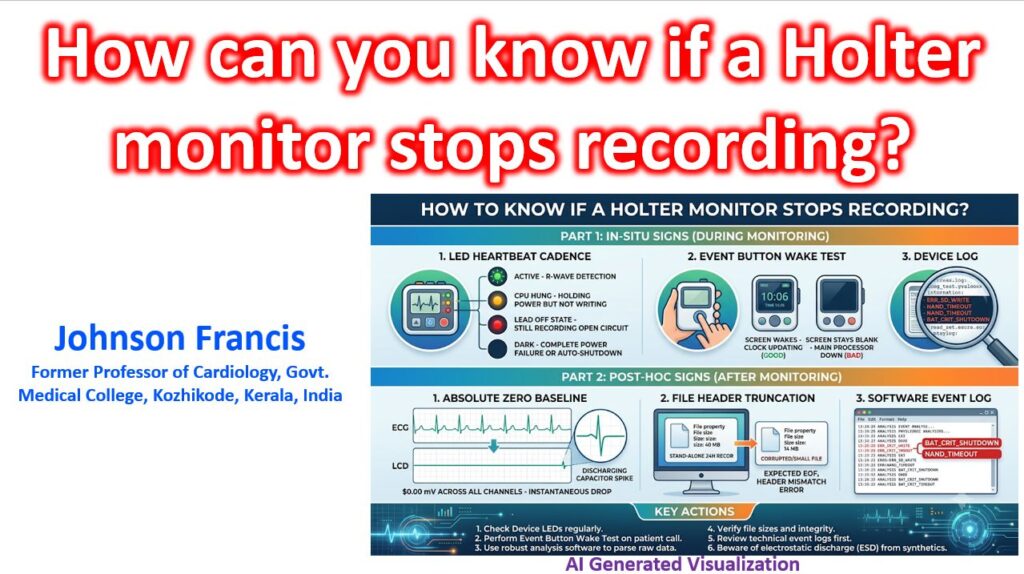

Because confirming a stopped Holter monitor depends entirely on whether you are looking at it in-situ (on the patient) or post-hoc (at the analysis workstation), the verification methods split into physical hardware cues and digital forensic signatures. Here is how to confirm a dead recording across both phases, broken down for standard multi-lead boxes and modern patch monitors.
1. In-Situ (During the Monitoring Period)
If a patient calls the clinic suspecting the device has stopped, have them check for three specific hardware flags:
- The LED “Heartbeat” Cadence: On almost all modern digital monitors, a blinking green LED corresponds to the R-wave detection or an active write-cycle.
- Solid Green / Solid Amber: The CPU has hung; it is holding power but not executing the write loop.
- Blinking Red / Flashing Amber: Usually indicates a Lead-Off state, but the unit is still recording the open circuit.
- Dark: Complete power failure or it has entered its post-protocol auto-shutdown.
- The “Event Button” Wake Test: On models with an LCD screen that sleeps to save battery, pressing the Patient Event button should instantly wake the display and drop a time-stamp. If the screen stays blank, the main processor is down. If it wakes but the internal digital clock is frozen, the real-time clock (RTC) has dropped out and recording has ceased.
- Gateway Status for Telemetry/Mobile Cardiac Outpatient Telemetry (MCOT units): If it is an active monitor, the paired base station or smartphone app will throw a “Sensor out of range” or “No Data Received for X minutes” fatal flag. This distinguishes an actual monitor crash from a simple cellular dead zone (where the patch keeps recording to internal flash to dump later).
2. Post-Hoc (At the Analysis Workstation)
When you pull the SD card or plug the monitor into the dock and open the parsing software, a stopped recording leaves distinct diagnostic footprints:
The “Absolute Zero” Baseline
You have to distinguish between a detached lead and a dead analog-to-digital converter (ADC).
- True Asystole: Shows slight somatic tremor, baseline wander, or a subtle P-wave/escape attempt before the drop.
- Lead-Off: The affected channel drops to a flatline, but the baseline will be “thick” with 50/60Hz line noise, or the remaining channels will show extreme, wild axis shifts as the differential amplifier struggles to find a reference.
- Device Stop / Power Loss: All channels drop instantaneously to a mathematically flat 0.00 mV line at the exact same millisecond. There is zero baseline wander. Frequently, you will see a single, sharp, un-physiological “spike” (an artifact of the capacitor discharging) at the exact sample point where the write-cycle died.
File Header Truncation
If the monitor lost power abnormally (e.g., the patient dropped it and the battery unseated for a fraction of a second), the file will lack a closing footer.
- When the software attempts to ingest the
.dat,.ecg, or.edffile, it will throw aCorrupt File,Unexpected EOF(End of File), orHeader Mismatcherror. - Look at the raw file properties in the computer’s OS: a standard 24-hour, 3-channel, 250Hz recording generates a very predictable file size (typically around 35 MB to 45 MB depending on compression). If your 24-hour file is sitting at 14 MB, the operating system stopped writing to the NAND flash halfway through the day.
The Software “Event Log”
Before looking at the morphology, open the Device Log (sometimes called the Technical Summary tab). If the unit stopped programmatically rather than via a hard power-cut, the firmware will have left a death rattle code:
ERR_SD_WRITE/NAND_TIMEOUT: The monitor was trying to record, but the SD card suffered a write-lock or bad sector.BAT_CRIT_SHUTDOWN: The voltage sagged below the safe operational threshold (often triggered when a patient presses the event button, causing a momentary spike in current draw that a dying battery couldn’t support).
Pro-Tip for the Clinic
If you are dealing with a standard wired Holter that “mysteriously” stops recording 4 to 6 hours into a 24-hour session, check the patient’s clothing.
The #1 cause of silent, unlogged mid-test shutdowns in dry, air-conditioned environments is Electrostatic Discharge (ESD). When a patient takes off a 100% polyester or wool sweater, the static charge travels down the ECG leads directly into the analog front-end. The monitor’s safety diodes will shunt the voltage to protect the patient, but the resulting ground-bounce frequently triggers a hard, unrecoverable CPU reset that the unit cannot wake itself up from.